

一連の流れ及び操作を示します。コマンドの内容を理解して操作を進めましょう。
初めてのコミットをしてみる
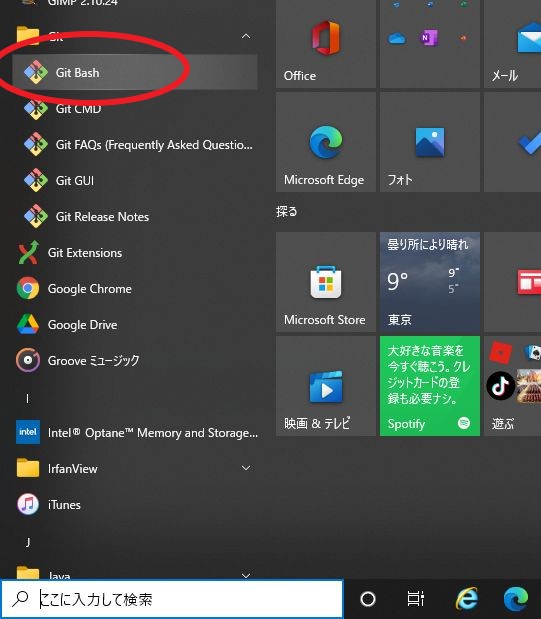
1.GitBush(Macの人はターミナル)を実行
ローカルレポジトリでの操作
2.自分の作業したい場所にディレクトリを作成してください。
ディレクトリを作成次第、「index.html」というファイルもディレクトリ内に作成します。
|
1 2 3 4 5 |
$ mkdir myweb #ディレクトリを作成します。 //① $ cd myweb/ //② $ git init //③Gitリポジトリを作成し履歴等を保存できるようにする Initialized empty Git repository in C:/myweb/.git/ $ echo "# techUP_育成用study" >>index.html ⬅ファイルを作成します。 //④ |
3.コミットする
コミット履歴の内容を保存します。
|
1 2 3 4 5 6 7 |
$pwd //①mywebに位置していることを確認 ~/myweb (master) $ git add index.html //② $ git commit //③ [master (root-commit) 3805a9b] 初期のcommit 1 file changed, 1 insertion(+) create mode 100644 index.html |
下記のような画面が出てきますので、初期の commitと記載します。
|
1 2 3 4 5 6 7 8 9 10 |
初期の commit //①追加部分 # Please enter the commit message for your changes. Lines starting # with '#' will be ignored, and an empty message aborts the commit. # # On branch master # # Initial commit # # Changes to be committed: # new file: index.html |
CommandLineの方:(ESC)キー:記述終了、書き込む時は「:」(コロン)キー コマンド入力開始、wキー,ENTER(書き込み)、qキー,ENTER(終了)
4. git log コミット履歴
|
1 2 3 4 5 6 7 8 |
$pwd //①現在のディレクト位置を確認 ~/myweb (master) $ git log //② commit 3805a9b19ca5fe95205b7e3928045540f65fecca (HEAD -> master) Author: fujimoto <fujimoto04@gmail.com> Date: Mon Jan 10 14:59:58 2022 +0900 初期の commit |
gitを操作してみよう。
ここでは作業の流れを見ていきます。一連の流れの内容を理解しておきましょう。
コマンドを打って内容を確認してください!
1.ファイルを編集する
「echo」で「techUP_育成用study」文言を変更できます。
直接エディタで内容を変更するか、以下のコードを参考に、ターミナル上で書き換えてください。
|
1 2 3 4 |
$ echo "変更後の文言" >変更対象のファイル名 -- 作業例 -- echo "2回目techUP_育成用studyの変更" >index.html |
2.変更を確認
git diffで変更された内容の差分を表示します。
|
1 2 3 4 5 6 7 8 9 10 11 12 |
$pwd //① ~/myweb (master) $ git diff //② warning: LF will be replaced by CRLF in index.html. The file will have its original line endings in your working directory diff --git a/index.html b/index.html index 9ac3cf0..0ced00f 100644 --- a/index.html +++ b/index.html @@ -1 +1 @@ -# techUP_育成用study +# techUP_SE育成用編集 |
3.更新とコミットをする
ファイルすべてを更新する場合 (git add .)
index.htmlだけ更新する場合 (git add index.html)
|
1 2 3 4 |
~/myweb (master) $ git add . warning: LF will be replaced by CRLF in index.html. The file will have its original line endings in your working directory |
ファイルすべてをコミットする場合 (git commit)
index.htmlだけコミットする場合 (git commit index.html)
|
1 2 3 4 |
~/myweb (master) $ git commit [master 156dd1c] 2回目コミット 1 file changed, 1 insertion(+), 1 deletion(-) |
4.ファイル更新確認
以下のコマンドを実行してみてください。
|
1 2 3 4 5 |
git log --graph //①Gitのログを表示する際に、コミットのグラフ構造を表示するオプション git log --oneline //②Gitのログを短縮形式で表示するオプション git log -p //③Gitのログを表示する際に、各コミットの差分(パッチ)も一緒に表示するオプション git log --stat //④Gitのログを表示する際に、各コミットの統計情報(変更されたファイルの数や行数の変更)も表示するオプション git diff (コミットされたため差分はありません。) //⑤差分を調べる |
5. git status 状態確認
作業ディレクトリ内のブランチをstatusコマンドで現在の状態を表示します。
git status を実行する
|
1 2 3 4 5 6 7 8 9 |
~/Downloads/myweb (master) $ git status On branch master Changes not staged for commit: (use "git add <file>..." to update what will be committed) (use "git restore <file>..." to discard changes in working directory) modified: index.html no changes added to commit (use "git add" and/or "git commit -a") |
git status 内には、次にやる作業が記載されることがあります。
git diff で差分を確認してください。
6.ファイル作業の取り消し
①コミットする前にファイルの修正を戻したい場合、 restore でファイル内容を戻せます。
|
1 2 3 4 |
git restore <ファイル名 または、 <.> 例 git restore . ← . はすべてのファイルを戻します。 |
②git add の作業前に作業全ての取り消しをしたい場合
|
1 2 3 |
git checkout . //別ブランチに移動すると、変更内容が反映されていないとブランチに移動 または、 git restore . |
③git addの作業をした後に取り消したい場合
|
1 |
git restore --staged <ファイル名> or <.> |
④commitした後に取り消したい時に
|
1 |
git reset --soft HEAD^ |
管理に含めないファイルについて .gitignore
ログなど、Git の管理に含めないファイルを指定するためのファイル名
以下のようなファイル管理に利用します。
|
1 2 3 4 5 6 7 8 |
# exe ファイルをプッシュしない場合 *.exe # bin フォルダはいらない場合 bin/ # パッケージフォルダ内の .ts ファイルはいらない場合 package/**/*.ts # nuget.exe 必用なファイルをコミットしたい場合 !/.nuget/nuget.exe |
過去の commitした内容で、バージョンに戻す
|
1 2 3 4 |
#1つ前にもどす git reset --hard HEAD #2つ前にもどす git reset --hard HEAD^^ |
ブランチの作成
直近のバージョンから新しいブランチが作成されます。
|
1 2 3 4 5 6 7 8 9 10 11 12 |
~/Downloads/myweb (master) $ git branch ⬅ブランチの状況を確認 * master ~/Downloads/myweb (master) $ git branch new_branch ⬅ブランチ作成 new_branch作成 ~/Downloads/myweb (master) $ git checkout new_branch ⬅ master からnew_branchに切り替え Switched to branch 'new_branch' ~/Downloads/myweb (new_branch) ⬅ 切り替わりました |
git log コマンドで確認
ブランチをマージする
①ファイルを編集
new_branch のindex.html を以下のファイルに編集した場合
|
1 2 3 4 5 6 7 8 9 10 11 12 13 |
<!DOCTYPE html> <html> <head> <title>HTML, CSS and JavaScript demo</title> </head> <body> <!-- Start your code here --> <p class="lw">Hello!</p> <!-- End your code here --> </body> </html> |
②git更新
|
1 2 3 4 5 6 7 |
~/Downloads/myweb (new_branch) $ git add . ~/Downloads/myweb (new_branch) $ git commit [new_branch 3a3f771] html作成 1 file changed, 13 insertions(+), 1 deletion(-) |
③new_branchをmasterのブランチにマージする。
new_branch のファイルの内容が動作確認できれば、masterのブランチにマージします。
git merge <マージしたいブランチ名>
|
1 2 3 4 5 6 7 8 9 10 11 12 13 14 15 |
~/Downloads/myweb (new_branch) $ git checkout master ⬅マスターに切り替え Switched to branch 'master' ~/Downloads/myweb (master) $ git branch ⬅ブランチの場所を確認 * master new_branch ~/Downloads/myweb (master) $ git merge new_branch ⬅マスターにマージする Updating 868d57c..3a3f771 Fast-forward index.html | 14 +++++++++++++- 1 file changed, 13 insertions(+), 1 deletion(-) |
コンフリクト(マージの衝突)の解決
コンフリクトとは、複数人が同じ箇所を変更した場合に、どの記述を優先したらいいか分からない状態のときに解決する方法です。
コンフリクトファイルの準備
①new_branch のファイルの編集
|
1 2 3 4 5 6 7 8 9 10 11 12 13 |
<!DOCTYPE html> <html> <head> <title>HTML, CSS and JavaScript demo</title> </head> <body> <!-- Start your code here --> <p class="lw">テストブランチNEW_BRANCH</p> <!-- End your code here --> </body> </html> |
ファイルの更新
|
1 2 3 4 5 6 |
~/Downloads/myweb (new_branch) $ git add . ~/Downloads/myweb (new_branch) $ git commit -m "not 1 but first" [new_branch eaa821d] not 1 but first 1 file changed, 1 insertion(+), 1 deletion(-) |
②masterブランチファイルの編集
masterにブランチを切り替えて編集してください。
|
1 2 3 4 5 6 7 8 9 10 11 12 13 |
<!DOCTYPE html> <html> <head> <title>HTML, CSS and JavaScript demo</title> </head> <body> <!-- Start your code here --> <p class="lw">テストブランチMASTER</p> <!-- End your code here --> </body> </html> |
ファイルの更新
|
1 2 3 4 5 |
$ git add . ~/Downloads/myweb (master) $ git commit -m "not 2 but first" [master 026dc25] not 2 but first 1 file changed, 1 insertion(+), 1 deletion(-) |
③new_branchをmasterにマージする
以下のマージコンフリクトが発生しています。
|
1 2 3 4 5 6 7 8 9 10 11 12 13 14 15 16 17 18 |
~/Downloads/myweb (master) $ git merge new_branch //① Auto-merging index.html CONFLICT (content): Merge conflict in index.html Automatic merge failed; fix conflicts and then commit the result. ~/Downloads/myweb (master|MERGING) $ git status //② On branch master You have unmerged paths. (fix conflicts and run "git commit") (use "git merge --abort" to abort the merge) Unmerged paths: (use "git add <file>..." to mark resolution) both modified: index.html no changes added to commit (use "git add" and/or "git commit -a") |
④コンフリクトの修正
下記のコンフリクトしている箇所を無駄な部分を削って、理想のカタチに整えます。(この場合masterを優先)
|
1 2 3 4 5 6 7 8 9 10 11 12 13 14 15 16 17 |
<!DOCTYPE html> <html> <head> <title>HTML, CSS and JavaScript demo</title> </head> <body> <!-- Start your code here --> <<<<<<< HEAD <p class="lw">テストブランチMASTER</p> ======= <p class="lw">テストブランチNEW_BRANCH</p> >>>>>>> new_branch <!-- End your code here --> </body> </html> |
⑤masterブランチを編集後 コミット、new_branchをマージする
|
1 2 3 4 5 6 7 8 9 10 11 12 13 14 15 16 17 18 19 20 21 |
~/Downloads/myweb (master|MERGING) $ git add . //① ~/Downloads/myweb (master|MERGING) $ git commit -m "conflict fixed" //② [master 6b9922e] conflict fixed ~/Downloads/myweb (master) $ git merge new_branch //③⬅編集したnew_branchをmasterにマージする Already up to date. maintuyo2@TUYO-PC2 MINGW64 ~/Downloads/myweb (master) $ git checkout new_branch //④ Switched to branch 'new_branch' ### new_branchもmasterをマージする ### ~/Downloads/myweb (new_branch) $ git merge master //⑤ Updating eaa821d..6b9922e Fast-forward index.html | 2 +- 1 file changed, 1 insertion(+), 1 deletion(-) ~/Downloads/myweb (new_branch) $ git log //⑥⬅履歴確認 |
|
1 2 3 4 5 6 7 8 9 10 11 12 13 14 15 16 17 18 19 20 21 22 23 24 25 26 27 28 29 30 |
commit 6b9922eb98bf4445ddf9f640d5c6b5bd785d1070 (HEAD -> new_branch, master) Merge: 026dc25 eaa821d Author: fujimoto <fujimoto04@gmail.com> Date: Mon Jan 10 21:10:38 2022 +0900 conflict fixed commit 026dc25b81b43a9a088c9e02831b6e9a0bd7a716 Author: fujimoto <fujimoto04@gmail.com> Date: Mon Jan 10 20:47:53 2022 +0900 not 2 but first commit eaa821d7531d4b9b1466d4a1b12311cad7e7bae6 Author: fujimoto <fujimoto04@gmail.com> Date: Mon Jan 10 20:13:19 2022 +0900 not 1 but first commit 3a3f7715576d27af740a000b2d121513aeed7fbe Author: fujimoto <fujimoto04@gmail.com> Date: Mon Jan 10 18:50:55 2022 +0900 html作成 commit 868d57c46151cb9d97c3e32c9545f0cb31cb5a31 Author: fujimoto <fujimoto04@gmail.com> Date: Mon Jan 10 15:31:50 2022 +0900 初期のcommit |
復習用検索キーワード
| 検索例 |
| 🔍git mergeまでの流れ |
| 🔍git コマンド |
| 🔍git ローカル 最新のものに更新 |
コメント